
Download Tesuji – Free Go‑Player Training Software for Mac
Tesuji is a free, multilingual program designed specifically for macOS users who want to improve their Go (Weiqi) skills. Developed by Huafang Liu, this sports‑oriented application brings professional‑level teaching tools to the desktop, allowing beginners and seasoned players alike to study patterns, solve puzzles, and review classic games. Available in English, Simplified Chinese, and Traditional Chinese, Tesuji bridges language gaps and offers an intuitive interface that feels native to macOS.
Whether you’re looking to learn basic liberties, master complex joseki, or simply enjoy a polished Go‑board experience, Tesuji delivers a secure, regularly updated environment without any hidden fees. Its lightweight design ensures fast launch times and smooth gameplay, making it an ideal companion for daily practice or deep study sessions. As a free program, Tesuji eliminates the cost barrier often associated with high‑quality Go software, while still providing a rich set of features that rival paid alternatives.
This article explores the core capabilities of Tesuji, walks you through installation and usage, checks compatibility with your Mac, and weighs its strengths against potential drawbacks, helping you decide if Tesuji is the right tool for your Go journey.
Key Features That Make Tesuji Stand Out
- Multilingual Interface: Switch seamlessly between English, Simplified Chinese, and Traditional Chinese, ensuring accessibility for a global audience.
- Professional Game Library: Access a curated collection of classic professional games, complete with move‑by‑move commentary and board analysis.
- Interactive Tesuji Puzzles: Solve thousands of tactical puzzles that target specific life‑and‑death situations, corner fights, and cutting points.
- Custom Board Settings: Adjust board size, stone style, and background themes to match personal preferences or tournament standards.
- Real‑time Position Review: Load SGF files, replay moves, and annotate positions with markers, text notes, and variations.
- Integrated AI Assistance: Optional engine support provides move suggestions and evaluation scores for deeper insight.
- Export & Share: Export games as SGF or PNG files, making it easy to share puzzles or game records with friends and teachers.
- Automatic Updates: The app checks for updates at launch, delivering security patches and new puzzle sets without manual intervention.
- Lightweight & Secure: No hidden ads or telemetry; the installer is signed by the developer, guaranteeing a safe installation on macOS.
Each of these features is crafted to enhance the learning curve for Go enthusiasts. The multilingual support not only widens the user base but also encourages cross‑cultural study, allowing players to compare strategies from different regions. The built‑in puzzle engine focuses on tesuji—the decisive, skillful moves that can turn the tide of a game—hence the app’s name. By offering both a robust professional game library and AI assistance, Tesuji provides a comprehensive ecosystem for study, practice, and analysis, all wrapped in a clean macOS‑native design.
Installation, Usage Instructions, and macOS Compatibility
Getting Tesuji up and running on your Mac is straightforward. Follow these steps to ensure a smooth installation:
- Download the Installer: Visit the official Tesuji download page and click the “Download for macOS” button. The file is a signed
.dmgpackage, approximately 45 MB in size. - Open the DMG: Double‑click the downloaded file to mount the disk image. Drag the Tesuji icon into your
/Applicationsfolder. - Security Settings: If macOS warns about an unidentified developer, go to System Preferences → Security & Privacy → General and click “Open Anyway.” The app is signed by Huafang Liu, so this step is safe.
- First Launch: Launch Tesuji from the Applications folder. The app will prompt you to choose your preferred language and check for updates.
- Configure Preferences: In the Settings menu, adjust board size, stone style, and enable AI assistance if desired. You can also import SGF files via the “File → Open” menu.
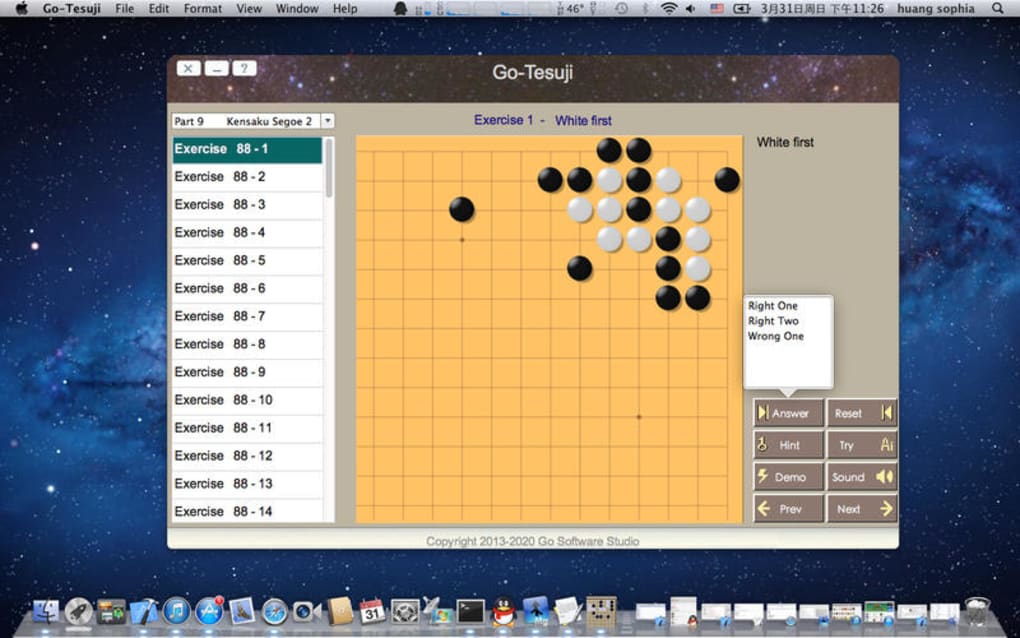
Once installed, using Tesuji is intuitive. The main window displays a classic Go board with toolbar icons for common actions: new game, load game, solve puzzle, and review mode. Selecting “Solve Puzzle” presents a random tesuji challenge; you can request hints or reveal the solution after a set number of attempts. The “Review” mode allows you to step through professional games, add your own commentary, and explore alternative variations by branching off the main line.
Compatibility: Tesuji requires macOS 10.14 (Mojave) or later. It runs natively on Intel‑based Macs and Apple Silicon (M1, M2) thanks to Apple’s Rosetta 2 translation layer, though native ARM support is built in for optimal performance. The app consumes less than 200 MB of RAM during normal use and does not interfere with other running applications.
Regular updates are delivered through the built‑in updater, ensuring that users receive new puzzle sets, bug fixes, and compatibility tweaks for the latest macOS releases. Because Tesuji is free, there are no subscription fees or in‑app purchases—just a community‑driven commitment to keep the software current and secure.
Pros and Cons – An Honest Assessment
Pros
- Completely free with no hidden ads or premium tiers.
- Rich multilingual support (English, Simplified & Traditional Chinese).
- Extensive library of professional games for study.
- Focused tesuji puzzles that improve tactical vision.
- Lightweight, fast loading, and low system resource usage.
- Secure, signed installer and automatic update mechanism.
- Optional AI engine for deeper analysis without forcing a subscription.
Cons
- No built‑in online matchmaking or multiplayer mode.
- Limited customization compared to some commercial Go platforms (e.g., no cloud sync).
- AI engine is optional and may require manual configuration for advanced users.
- Documentation is primarily in English and Chinese; other languages are not yet supported.
- While stable on macOS, there is currently no native Windows or Linux version.
Overall, Tesuji delivers a high‑quality learning environment for Mac users at no cost. Its focus on tesuji puzzles and professional game analysis makes it a valuable resource for players seeking to sharpen their tactical skills. The main drawbacks are the lack of online play and limited cross‑platform availability, which may be a deal‑breaker for users looking for a full‑featured Go ecosystem. Nevertheless, for anyone dedicated to improving their board sense on a Mac, the benefits far outweigh the limitations.
Frequently Asked Questions
Is Tesuji completely free or are there hidden costs?
Tesuji is 100% free. There are no subscription fees, in‑app purchases, or hidden advertisements. All features, including puzzle libraries and AI assistance, are available at no cost.
Can I play online against other players with Tesuji?
Currently Tesuji does not include an online matchmaking service. It focuses on solo study, puzzle solving, and game review. Users who need online play can use separate Go servers alongside Tesuji.
Does Tesuji support Apple Silicon natively?
Yes. Tesuji runs natively on Apple Silicon (M1, M2, etc.) and takes advantage of the ARM architecture for faster performance. Intel Macs are also fully supported.
How often is the puzzle database updated?
The developer releases new puzzle packs approximately every three months. Updates are delivered automatically when you launch the app and check for updates.
Can I import my own SGF files for analysis?
Absolutely. Tesuji supports standard SGF import, allowing you to load your own games, add comments, and explore variations using the built‑in review tools.
Conclusion – Should You Download Tesuji?
If you own a Mac and are serious about improving your Go skills without spending a dime, Tesuji is a compelling choice. Its rich puzzle library, professional game collection, and multilingual interface provide a comprehensive learning platform that rivals many paid alternatives. While it lacks online multiplayer and cross‑platform support, its strengths—free access, secure installation, and native macOS performance—make it an excellent addition to any Go player's toolkit. Download Tesuji today, explore the tesuji puzzles, and start sharpening your tactical vision on the board.
Click here to download Tesuji for free and begin your journey toward becoming a stronger Go player.







